Originally published November 2013. Fully rewritten March 2026 to reflect how Google Analytics works today.
Your website’s bounce rate used to be simple: someone landed on a page and left without clicking anything else. Google Analytics 4 changed the definition entirely. Here’s what bounce rate actually means now, why the old benchmarks don’t apply, and how to use engagement data to find the pages that are costing you visitors.
People falling from your ceiling

I wrote the original version of this post back in 2013, and I still think the best way to understand website traffic is to picture it physically.
Print out the pages of your website that get the most traffic. Lay them on the floor. Now imagine people falling from your office ceiling onto those pages.
For most websites the heaviest stream of falling people lands on the home page. If your site is well optimised you’ll see people arriving across many pages — service pages, blog posts, product categories. These are your landing pages.
Watch what happens next. Some visitors rebound from the landing page to another page, and then another, moving through your site. Others hit the page and vanish. Gone. One page, one glance, out the door.
That second group — the ones who arrive and disappear — are your bounces. And measuring them has always been one of the most useful things you can do with analytics data. But what counts as a “bounce” changed significantly in 2023.
The old bounce rate vs the new one
In Universal Analytics (the version most of us used until mid-2023), bounce rate was straightforward. Someone visited one page and left without doing anything else. That was a bounce. A 60% bounce rate meant 6 out of 10 visitors saw a single page and left.
GA4 redefined it. A bounce now happens when a session is not engaged. And a session counts as “engaged” if any of these are true:
- The visitor stayed longer than 10 seconds
- They viewed two or more pages
- They triggered a key event (like submitting a form or clicking to call)
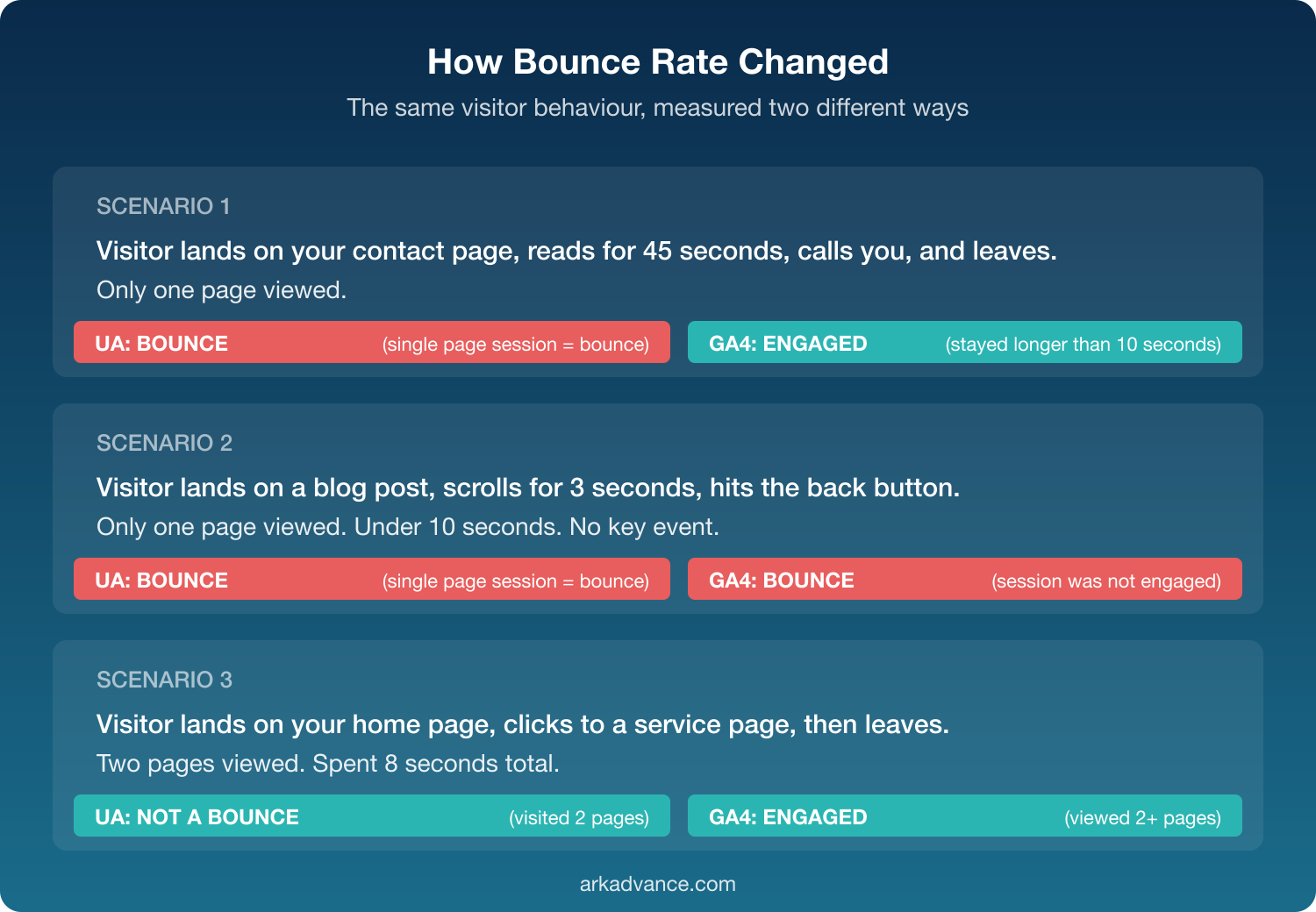
So in GA4 terms, someone who lands on your page, reads for 45 seconds, and leaves has not bounced — even though they only saw one page. Under the old system, that same visit was a bounce.
That’s a big deal. The old metric punished pages that did their job well. A visitor lands on your contact page, reads your phone number, and calls you. Under Universal Analytics, that was a bounce. Under GA4, if they spent more than 10 seconds there, it’s an engaged session.
Forget the old benchmarks
If you’ve been told your bounce rate should sit between 20% and 40%, that was Universal Analytics advice. It doesn’t translate directly to GA4.
GA4 bounce rates tend to be lower because the definition is more forgiving. A page that showed 55% bounce rate in UA might show 35% in GA4 — not because anything changed on your site, but because the measurement changed.
The more useful metric to watch now is engagement rate — the inverse of bounce rate. If your engagement rate is 65%, your bounce rate is 35%. Focus on engagement rate because it tells you the positive story: what proportion of visitors actually spent meaningful time on your site.
There’s no universal benchmark that applies to every website. A blog post with a 50% engagement rate might be performing well if people are reading the content and leaving satisfied. A product page with the same rate probably has a problem. Context matters more than hitting an arbitrary number.
Your paid traffic still needs watching
Go back to the ceiling metaphor. Some of those falling people have a gold tinge — they arrived after clicking a paid ad. Each one cost you money.
The engagement rate of your paid traffic should be at least as good as your site average. If it’s worse, something is off. Common culprits:
- Wrong keywords. You’re bidding on terms that attract the wrong audience. They arrive, realise this isn’t what they wanted, and leave.
- Wrong landing page. The keywords are right, but you’re sending people to your home page instead of the service page that matches their search.
- Right keyword, right page, wrong content. This is the hardest one. The visitor searched for exactly what you offer, landed on the right page, and still left. The page itself isn’t doing its job — the content, the layout, or the offer isn’t compelling enough to hold their attention.
GA4 lets you filter by traffic source and see engagement rates for each channel. Paid traffic that bounces more than organic traffic is a clear signal that something in your ad setup or landing page needs work.
The pages where people choose to leave
Not every departure is a bounce. A bounce is a one-page visit. An exit is when someone has been browsing your site — maybe two, three, four pages deep — and then decides to leave from a particular page.
Exit pages aren’t inherently bad. Your contact page will naturally have a high exit rate because people find your phone number and pick up the phone. That’s a success, not a problem.
The exits worth investigating are the ones that happen mid-journey. A visitor lands on your home page, clicks through to a service page, arrives at a pricing page, and leaves. Why? Maybe the pricing page layout is confusing. Maybe it asks them to make too many decisions at once. Maybe the phone rang. You can’t control the phone, but you can simplify the page.
GA4 still tracks exits, though it’s less prominent than it was in Universal Analytics. You’ll find it by looking at page-level reports and adding the “exits” metric. The pages worth investigating are the ones with high exit rates that sit in the middle of your conversion path — not at the end of it.
The pages that keep people moving
Following the 80/20 principle, a small number of your pages will do most of the heavy lifting in keeping visitors engaged. These are the pages with high engagement rates and low exit rates — the glue that moves people deeper into your site.
When you find them, study what makes them work. Is it the content structure? The internal links guiding people forward? Then look at the pages where people drop off and ask what’s different.
The data tells you where people are leaving. Your job is to figure out why — and whether there’s something you can do about it.
What to check first
If you take one thing from this post, open GA4 and look at two numbers:
- Your home page engagement rate. This is usually the first page people see. If it’s below 50%, visitors are arriving and leaving without exploring. That’s worth investigating — your home page should be the lowest-bounce page on the site.
- Engagement rate by traffic source. Compare paid vs organic vs referral. If one channel is significantly worse than the others, that’s where to focus. Paid traffic with low engagement means you’re spending money on visitors who don’t stick around.
Everything else is refinement. But those two numbers will tell you whether you have a problem worth digging into.
If you’d like help making sense of your analytics, take a look at our Google Analytics consulting services.